1
Sign In With Lark
You open the app and press Continue With Lark. There is no password to remember, and none to delete when someone leaves — when a Lark account is switched off, access to this app stops with it.


600
AvailableABP · Mohamad Zulfaiz Rofi
Every vendor on one map, with a real driving route between any two.
Why it exists
Vendor locations lived in a Lark table as addresses and Google Maps links. Answering the question “who else is near this one?” meant opening links one at a time and judging distances by eye. Vendor Tracker puts the same table on a map, colours it by status, and measures the road distance for you.
Impact
What changed for the people who use it, from the project’s own records.
| Before | With Vendor Tracker | |
|---|---|---|
| Who is near this vendor? | Addresses and Google Maps links in a Lark table, opened one at a time, distances judged by eye. | Every vendor on one map, and everyone nearby listed by road distance, nearest first. |
| Planning a day of visits | Guesswork between links. | A driving route between any two vendors, with the distance and the time. |
| Vendors that would not map | Found and fixed one row at a time, and chased with each account manager by hand. | Repaired by the app where it can; the rest go to each account manager as a Lark card. |
| Two AMs, one spot | Neither knew about the other, and both made promises — raised by ZCM. | A spot is held for 14 days and shows as a gold ring on every copy of the map. |
| Who has a copy | An installer forwarded between colleagues, carrying a bot that could write to and delete from the vendor Base. | 8 asked and 7 are using it, each signing in with Lark — and no Lark secret on any laptop. |
Source: Vendor Tracker’s README and docs; the request and user counts are ABP’s, 6 October 2026.
Who it is for
If none of these is you, it is probably not the tool you want — say so on the form and ABP will point you at the right one.
Account managers
See only your own vendors, find who is near the one you are visiting, plan the order you drive them in, and hold a spot for someone who wants to become a ZUSahawan.
Vendor operations
See which vendors cannot be placed on the map, and send each account manager a Lark card listing theirs to fix.
Project managers
One current picture of where partners are and what state each is in, without asking anyone to export a sheet.
Documentation
The same guide the app shows under its Guide button, so you can read it before you have it. Every screenshot is the real app; every vendor in them is invented.
You open the app and press Continue With Lark. There is no password to remember, and none to delete when someone leaves — when a Lark account is switched off, access to this app stops with it.
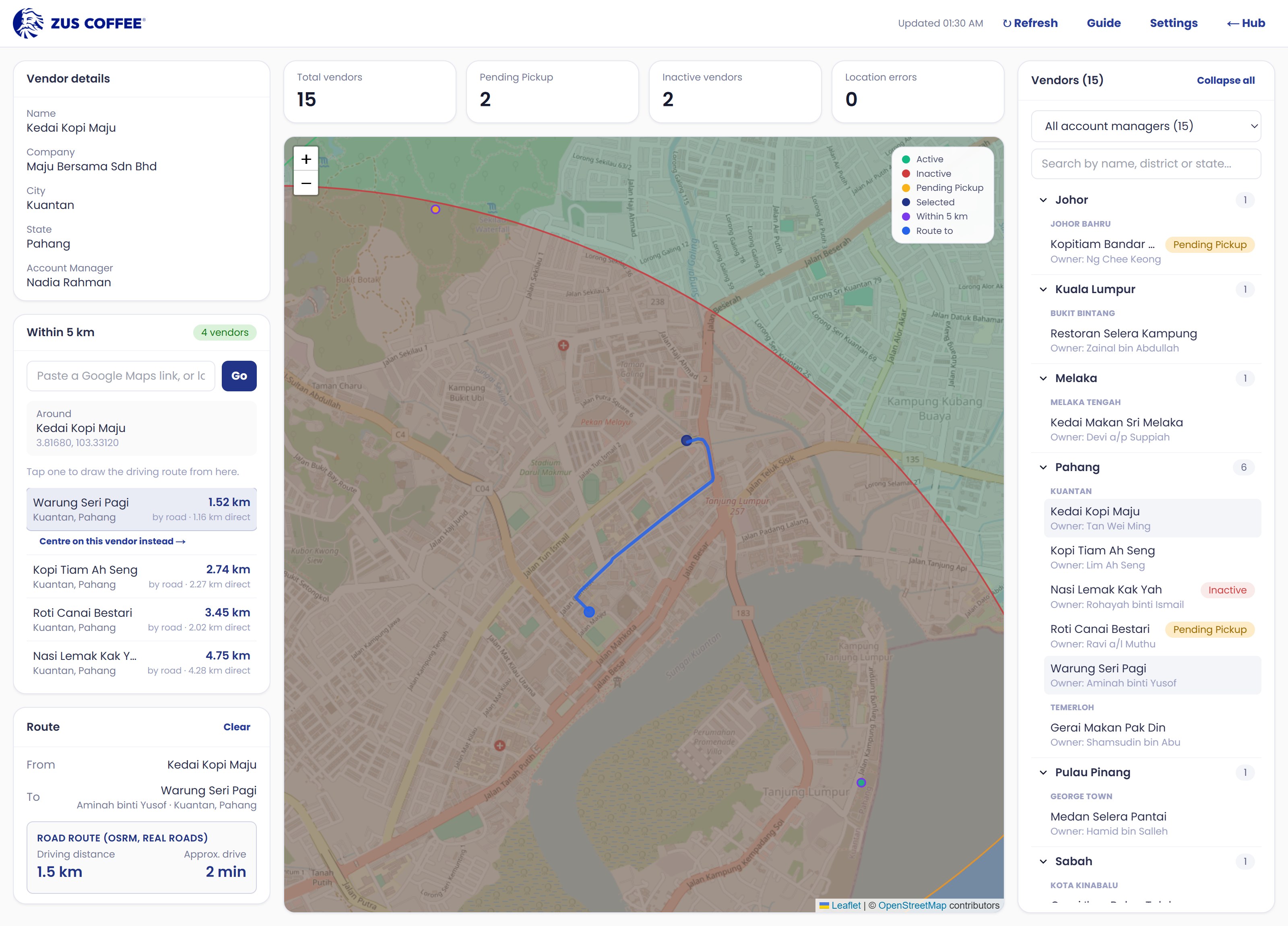
Pins are coloured by the Status field in Lark — Active, Inactive, Pending Pickup and the rest. Filter by account manager to narrow the list, or click any pin to select it.
Select a vendor and the nearby card lists everyone around it, nearest first, by road distance rather than straight-line distance. This is the part that plans a day of visits. The radius is a team setting — 5 km unless someone changed it, anywhere from 1 to 10.

Tap a second vendor and the app draws the driving route between the two, with the distance and the time.

Some vendors have a Business Location that Lark cannot read coordinates from, so they never appear on the map. The app now repairs the ones it can by itself, and lists the rest by account manager — with a button that sends each manager a Lark card of theirs to fix.

When someone who wants to become a ZUSahawan asks about a location, hold it for them. Every copy of the app shows the spot as a gold ring for 14 days, so a second account manager does not promise the same place to someone else.
A few numbers every copy shares — how long a spot is held, the warning distance, and the nearby radius. Anyone signed in can change them, and each change records who and when.
Limits worth knowing
Written down because it is cheaper to read this now than to find it out in front of someone.
Who made it
Developer
Published by
Contributors
The details
Requires — Windows
Windows 10 or newer, 64-bit. Nothing to install alongside it.
Requires — macOS
macOS 11 or newer. Universal — Intel and Apple Silicon.
Data safety
Written so you could check each line rather than take it on trust. If one of them turns out to be wrong, that is a bug in the tool, not a wording problem here.
Before you ask
No. The packaged app already knows how to reach the vendor data. You install it, sign in with Lark, and it works.
Partly. It keeps the last list it downloaded, so the map still opens. Refresh, routes and sign-in need a connection.
That is SmartScreen warning you the installer is not code-signed, which is true of every tool ABP ships today. Click More info, then Run anyway. If you would rather not, ask for the portable zip instead — it needs no install.
It will install, but it will not let you in — sign-in still goes through Lark and you have to be on the app’s list. Ask here instead, so the access is granted at the same time as the file.
Support
Message ABP in Lark. That is the fastest route and it reaches whoever is closest to the problem.
Maintained by
Mohamad Zulfaiz Rofi, ABP
Where the source lives
Internal, on the ABP machines. There is no public repository and no third-party code hosting for any tool on this site.